New Mac user here [MacBook Pro - OS X Snow Leopard].
As a lifetime PC guy I'm in the thick of adjusting to all the nuances right now. Anyone care to recommend tips/tricks, dashboard apps, etc that they've found useful?
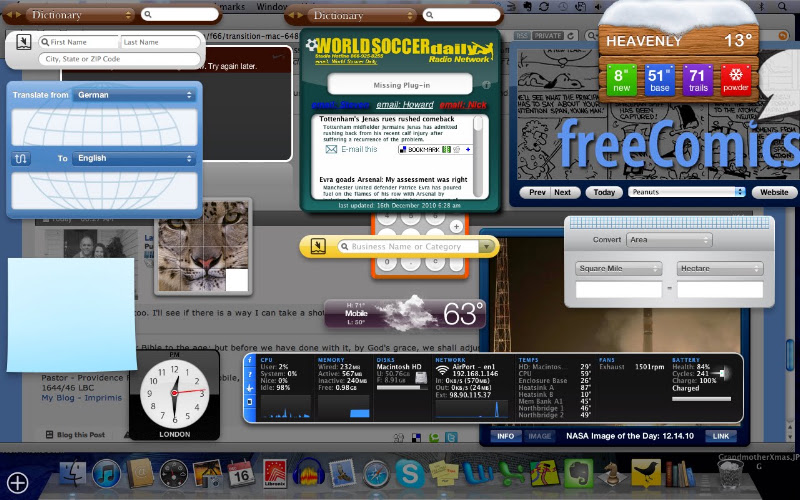
The best advice I can give you is just jump in. Mac OS is very intuitive. My dashboard has the following on it right now (I add and delete things as needed.):
Address Book
Business Yellowpages
Calculator
Dictionary
ESPN
Flight Tracker
Free Comics
Google
iCal
iStatPro
iTunes
Movies
Nike+
NASA Image of the Day
Ski Report
Stickies
Stocks
Tile Game
Translator
Unit Converter
Weather
World Clock
World Soccer Scores and News
Make sure your trackpad is set up for the multi-touch features (System Preferences-->Trackpad). The two-finger scrolling and four-finger features are amazing. Also, make sure you have corners/Expose set up (System Preferences-->Expose/Spaces-->Expose). You can have different corners set up for different features.
I know it will be tough parting company, but you'll just have to let go of language clarity such as ".idl" and ".dll." You'll also have to deal with the problem of a Mac being the best platform out there for graphics, including photo, programs. I know it will be tough, but if you grin from ear to ear, you'll get used to it.
Welcome to the club! I made the transition a few months ago, don't want to go back. I recommend you get Lighthead - Caffeine caffeine for your Mac. It stops it shutting off or dimming.
Thanks yall. It's mostly for music [Pro Tools] but after a few days of tinkering I'm really impressed with how smoothly it handles everything else too.
Lawrence, how do you fit all that on your dashboard?
Very carefully Some of the widgets over lap a bit and I can click a corner or edge to bring one to the front and another to the rear. I actually could fit a few more if I wanted.
Very carefully Some of the widgets over lap a bit and I can click a corner or edge to bring one to the front and another to the rear. I actually could fit a few more if I wanted.
I have a 13" screen so it seems like a lot anyway. So far I just have clock, calendar, weather, sticky note, and something I downloaded for screen shots.